Welcome to Revision History
Thanks for installing! You're about a minute away from seeing exactly how your students write — every keystroke, paste, and revision. Here's how to get started.
Quick start
Three steps. About 60 seconds.
- 1
Sign in
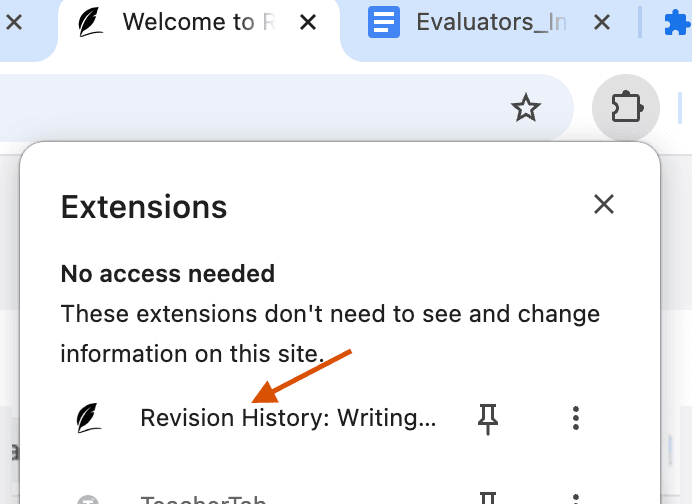
The sign-in popup should have opened automatically when you installed the extension. Sign up with your Google account (recommended) or with your email and a secure one-time link. If you closed it, just click the puzzle icon in Chrome's toolbar and pick Revision History to reopen it.
- 2
Open a Google Doc
Navigate to any Google Doc — yours or one a student has shared with you. The extension icon will appear in Chrome's toolbar at the top right as soon as you're on a document.
- 3
Look for the top bar
A new bar appears at the top of the document showing writing time, paste count, and an AI-pattern flag. Click any metric to dig deeper. If metrics don't show up right away, just refresh the page to see the latest data.

What you can do
A quick tour of the features you just unlocked.
Replay the writing
Watch the document get written from blank page to final draft — scrub through it like a video.
Active writing time
See real time-on-task, not just "last edited."
Copy & paste detection
Pasted content gets highlighted and counted so you can ask students about the source.
Unusual writing patterns
We flag suspicious editing behavior — not as proof, but as a starting point for conversations.
Teacher insights
Aggregate metrics across an assignment so you can see the class at a glance, not one doc at a time.
Private by design
Document content is processed locally in your browser. We never see the text of your students' work without explicit opt-in.
Watch feature walkthroughs
Short videos showing the features in action.
Interpreting Unusual Writing Process Flags
Share Replay Feature
User Contribution Breakdown Feature
Common questions
The things teachers ask in their first week.
Do I need a paid plan to start?
No. The free tier lets you analyze a limited number of Google Docs per month. Upgrade to Plus anytime for unlimited Docs.
Can this prove that my students used AI?
We never give 100% certainty. Our tools don't claim to definitively prove AI usage, but rather give you the evidence needed to start a conversation. You can see how the document was actually built, spot unusual writing patterns, and make your own informed assessment.
Do I need access to the student's document?
Yes — you need edit access on the document to view its revision history. This applies to Google Docs shared with you or Google Classroom assignments where you've been granted edit permissions.
What about student privacy and FERPA?
All document content is processed locally in your browser — we never see the text of your students' work on our servers. This keeps Revision History compatible with FERPA and most school data policies.
Why don't I see the top bar?
Refresh the Google Doc tab after installing. If you still don't see it, make sure the extension is enabled at chrome://extensions and that you're signed into the same Google account you use for Docs.
Can my school deploy this for every teacher?
Yes. Admins can push Revision History to all teachers through the Google Workspace admin console. Email info@revisionhistory.com and we'll help with rollout.
Ready to try it on a real document?
Open any Google Doc — the extension will do the rest. If you get stuck, we're one email away.