Byline Means More Visibility for Teachers.Optional: Teacher-Controlled AI Feedback for Students.
Byline is a companion tool to Revision History that lets teachers see students’ process beyond just what happens in a Google Doc — student site visits, active extensions, and AI use while the Doc is open.
Two Ways to Run Byline
Teachers create an assignment code that carries their settings into Byline. Students enter the code, and the mode is set — it comes down to a single switch.
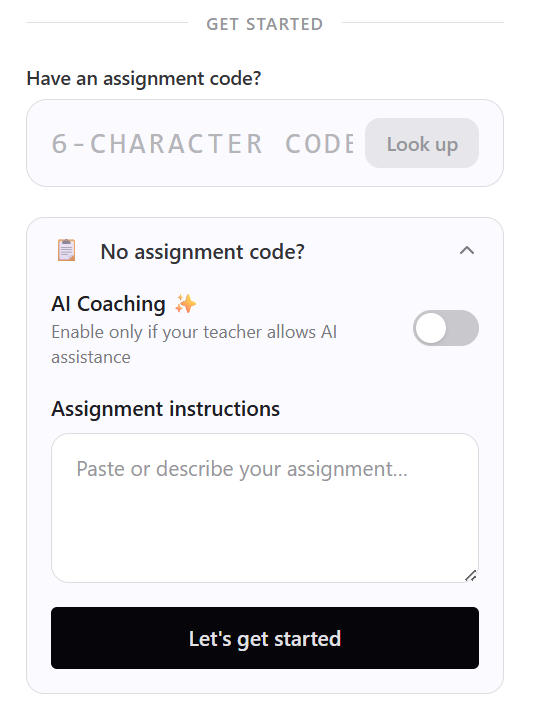 The student setup screen.
Process visibility only
For teachers who just want to see how the writing actually happened.
- ✓The full writing process inside the Google Doc
- ✓Site visits and active extensions outside it
- ✓Humanizers and auto-typing extensions blocked
- ✓No AI made available to students
Visibility + guardrailed coaching
For teachers who want students to use AI — with limits, and with a record.
- ✓Everything in process visibility mode
- ✓AI feedback through approved prompts only — not open-ended chat
- ✓Unlocked every 50 typed words
- ✓Every AI interaction logged and visible in Revision History
Either way, the accountability layer is the same. Site logging, extension blocking, and full process visibility do not depend on AI being turned on.
Full Transparency
The writing process — and any AI use — is logged and visible to teachers in Revision History
Blocks Problem Extensions
Humanizers and auto-typing extensions — the most common cheating tools — are blocked
Controlled Access
Students get AI feedback through approved prompts only — not open-ended chat
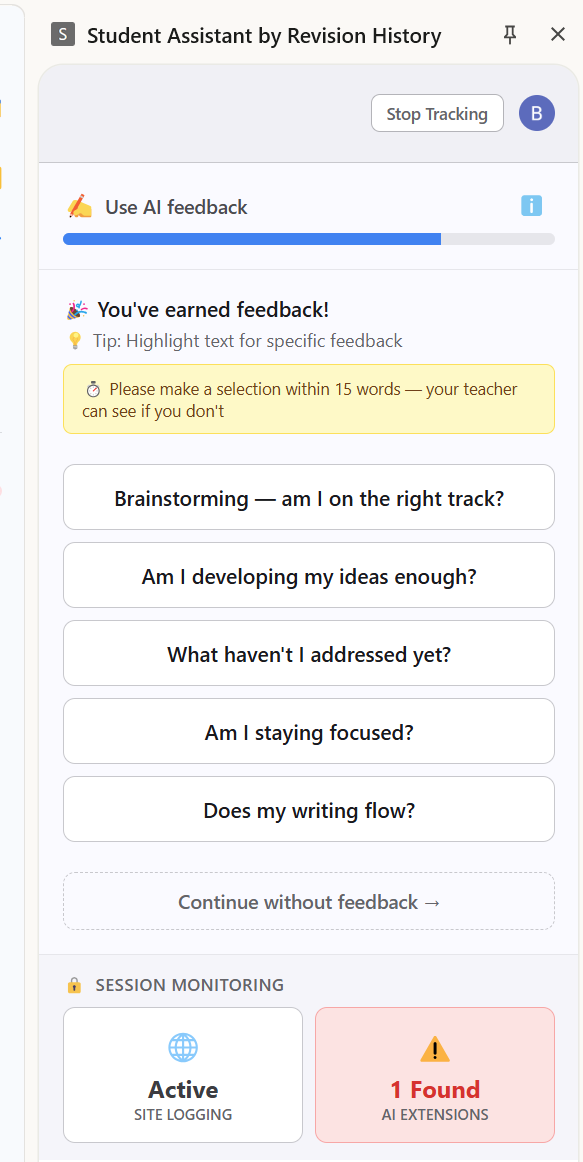 Byline feedback prompt options
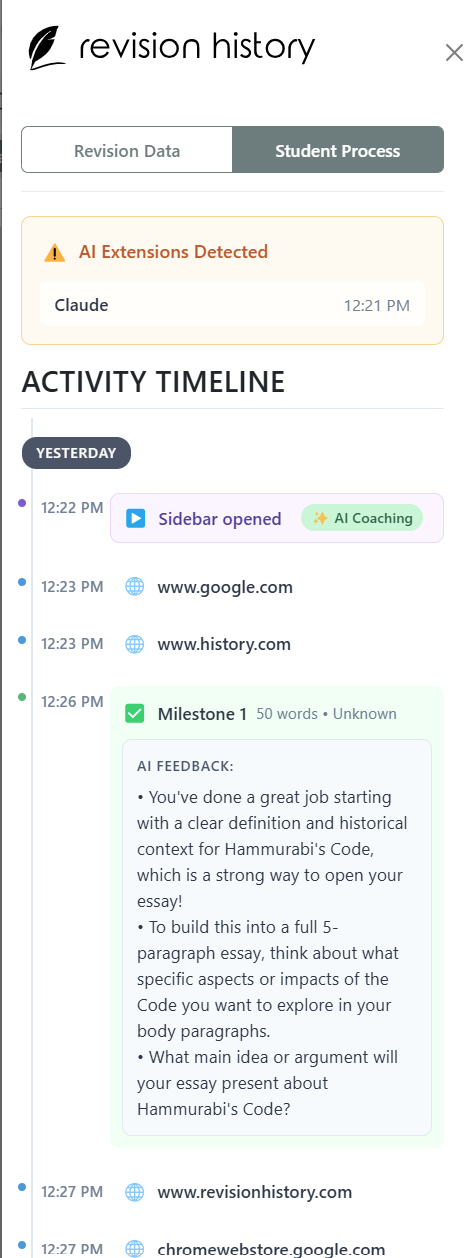 Revision History teacher view showing student AI activity
What Students Get With AI Coaching Turned On
An always-on extension sidebar that lives alongside students' Google Docs while they write
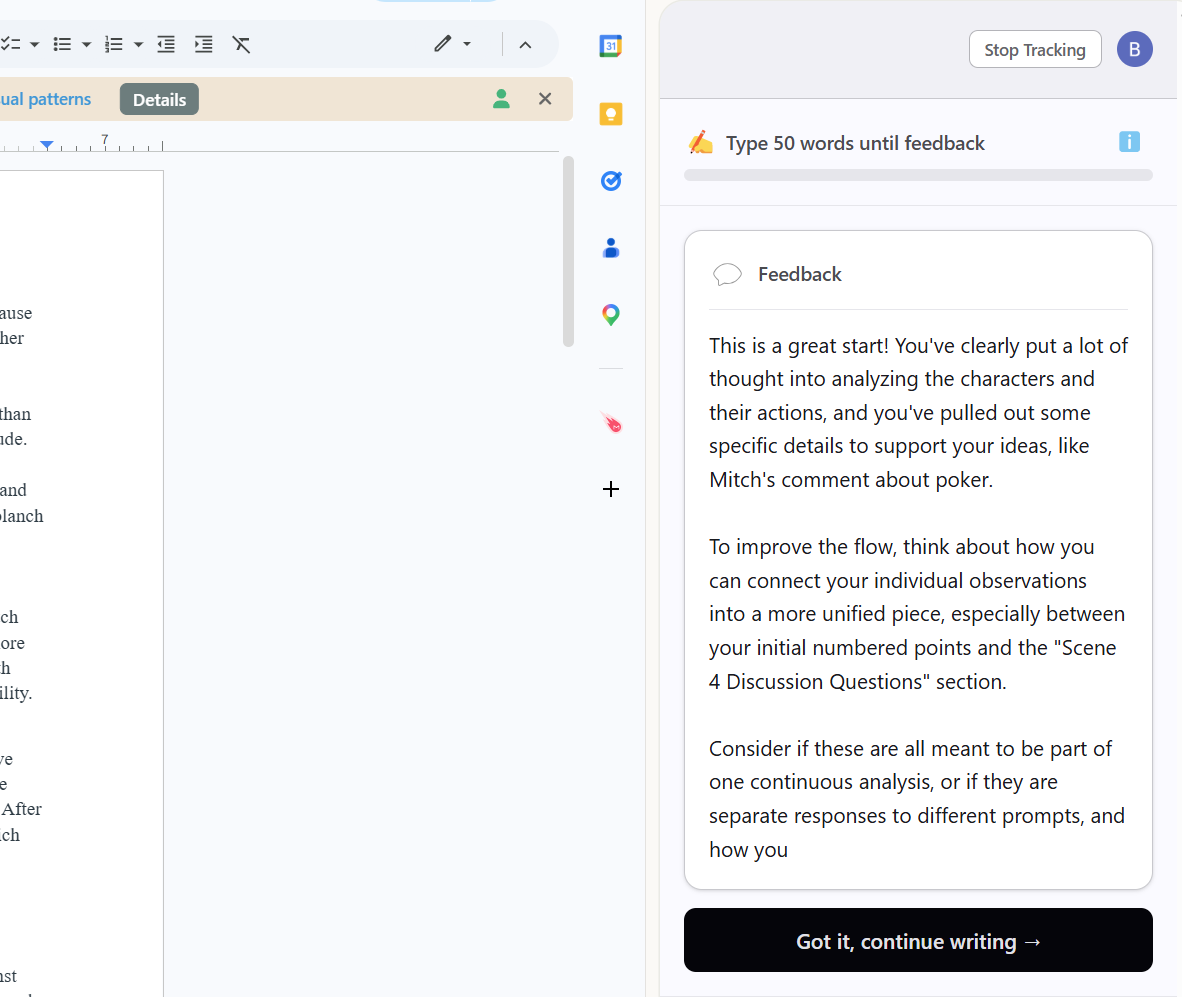
AI Feedback That Teaches
Every 50 typed words (copy/paste doesn't count), students unlock 5 pre-set feedback prompts. They can't type questions — they choose from prompts designed to build metacognitive skills. One response, then back to writing.
Problematic Extensions Blocked
Detects and blocks problematic Chrome extensions — especially humanizers and auto-typing tools that write for students. The most common way students circumvent writing assignments.
Insights When You Need Them
When you open a student's doc with Revision History, you'll see whether they used the tool, which prompts they clicked, and if any issues were detected — right alongside the revision data.
The Only AI Students Can Access
5 universal, pedagogically-designed prompts that teach metacognition — not dependency
"Brainstorming — am I on the right track?"
Helps students validate their direction early
Why these prompts?
- Can't generate essays — these prompts give feedback on student writing, not content generation
- Build metacognition — students learn to ask themselves good questions about their own writing
- Work for any assignment — universal prompts that transfer across writing types
What Teachers See When Opening a Doc
No changes to your existing workflow. Open a student's doc with Revision History and you'll see a chronological work trail — browsing history, extension activity, and AI feedback — right alongside the revision data.
Feedback Engagement
How many times they used AI feedback, which prompts they clicked, and when
Site Visits
Sites visited during writing are logged with timestamps. An opt-in page prevents accidental logging — research is allowed, just tracked.
Extension Issues Flagged
If problematic extensions (humanizers, auto-typers) were detected or blocked during the writing session
Works With Revision History
A companion tool that adds real-time context to the document analysis you already do
Revision History
Post-hoc document analysis
- Replay the full revision history
- See what changed, when, and how
- Detect unusual writing patterns
Answers: "What did this student write?"
For Students
Real-time writing support
- Controlled AI feedback as they write
- Block problematic Chrome extensions
- Log all engagement and context
Answers: "How did they use AI support?"
Note: Revision History itself collects no student data — teachers simply open documents. This companion tool would collect usage data from students to provide the insights teachers see.
Accountability Through Transparency
Not invasive proctoring — just clear boundaries and full visibility
✕What It's Not
- —No webcam or screen recording
- —No lockdown browser
- —Students can still browse and research
- —No anxiety-inducing surveillance
✓What It Is
- Students see exactly what's logged
- Deterrence through visibility
- Humanizers and auto-typers are blocked
- Runs quietly in a sidebar
The philosophy: Students know you can see their AI usage. That transparency shapes behavior and enables honest conversations about how AI can support — not replace — their learning.
Technical Details
Deployment
Can be deployed via Google Workspace admin console for school-wide or district-wide rollout. IT administrators can push the extension to student Chromebooks automatically.
Privacy & Security
- Student data is never stored or used in AI model training
- Data secure in transit and at rest with NIST-aligned security practices
- Only teachers with Edit Access to a Google Doc can see student data — built-in privacy
Who Is This For?
AI-Curious Schools
Schools exploring how to introduce AI responsibly into student learning
Revision History Users
Add real-time context to the document analysis you already do
Districts Setting AI Policy
Deploy district-wide for consistent, monitored AI access
Interested in Responsible AI for Your Students?
Byline by Revision History is a companion tool for schools and districts ready to introduce guardrailed, transparent AI into student writing.
Questions? Email us at info@revisionhistory.com